Ir al contenido principal

Java Project Structure

In Eclipse to add the structure folders choose New -> Soure Folder
Select the chech box "Update exclusion filters into other source folders to solve nesting"
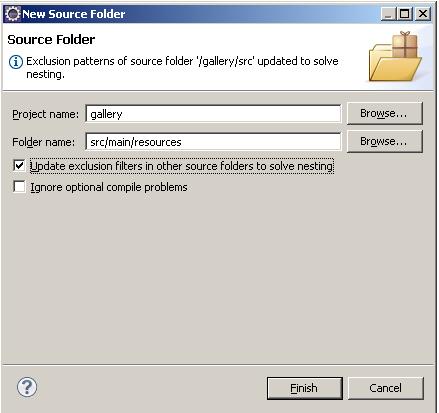


  • Within the project_name folder, we'll create the folders that are customary for a Java application:

project_name/src
project_name/src/main
project_name/src/main/java
project_name/src/main/resources
  • For web applications, we need a webapp and WEB-INF folder:

project_name/src/main/webapp
project_name/src/main/webapp/WEB-INF

  • We also need to create the folders that are required for unit testing our application:

project_name/src/test
project_name/src/test/java
project_name/src/test/resources

  • And finally, we'll create the two folders where Spring configuration files are ordinarily placed:

project_name/src/main/webapp/WEB-INF/spring


Comentarios

Entradas populares de este blog

Android - Basic Steps (Service)

Service Run in the main thread of the hosting application Android can kill the Service if need the resources Purpose Supporting inter-application method execution Performing background processing Start a Service Call Context.startService(Intent intent)\ To call from a Fragment use getActivity().getApplicationContext().startService( intentService); Executing the service After call startService(...)  In the Service is executed the method onStartCommand(...) If the method returns the constant START_NOT_STICKY then Android will not restart the service automatically if the the process is killedp Foreground To execute the service foreground call the method startForeground() Use this if the user is aware of the process Bind to a Service Call the method Context.bindService( Intent service ServiceConnection con int flags ) Send Toast from the Service On the method onStartCommand receive the message   ...

Android - Basic Steps (Location & Maps)

Location Is composed by Latitude Longitude Time-stamp Accuracy Altitude Speed Bearing LocationProvider Types: Network  Wifi access points Cell phone towers GPS Passive Piggyback on the readings requested by other application Permissions Network  android.permission.ACCESS_COARSE_LOCATION android.permission.ACCESS_FINE_LOCATION GPS android.permission.ACCESS_FINE_LOCATION Passive Provider android.permission.ACCESS_FINE_LOCATION LocationManager System service for accessing location data getSystemService( Context.LOCATION_SERVICE ) Functions Determine the last known user location Register for location update Register to receive intents when the device nears or move away from a given geographic area LocationListener Defines callbacks methods that are called when Location or LocationProvider status change. Methods onLocationChanged(...) onProviderDisabled(...) onProviderEnabled(...) onStatusChan...

IIS - Permisions

IIS Permissions To enable the Active Directory connection in the IIS, follow the next steps: Go to IIS Go to Application Pool Select your App Pool Select Advanced Settings in the right side In the section Process Model Select in Identity value the property " NetworkService " You don´t need to restart your application